✨Personal schedule planner template development with Typst-2025

✨Personal schedule planner template development with Typst-2025

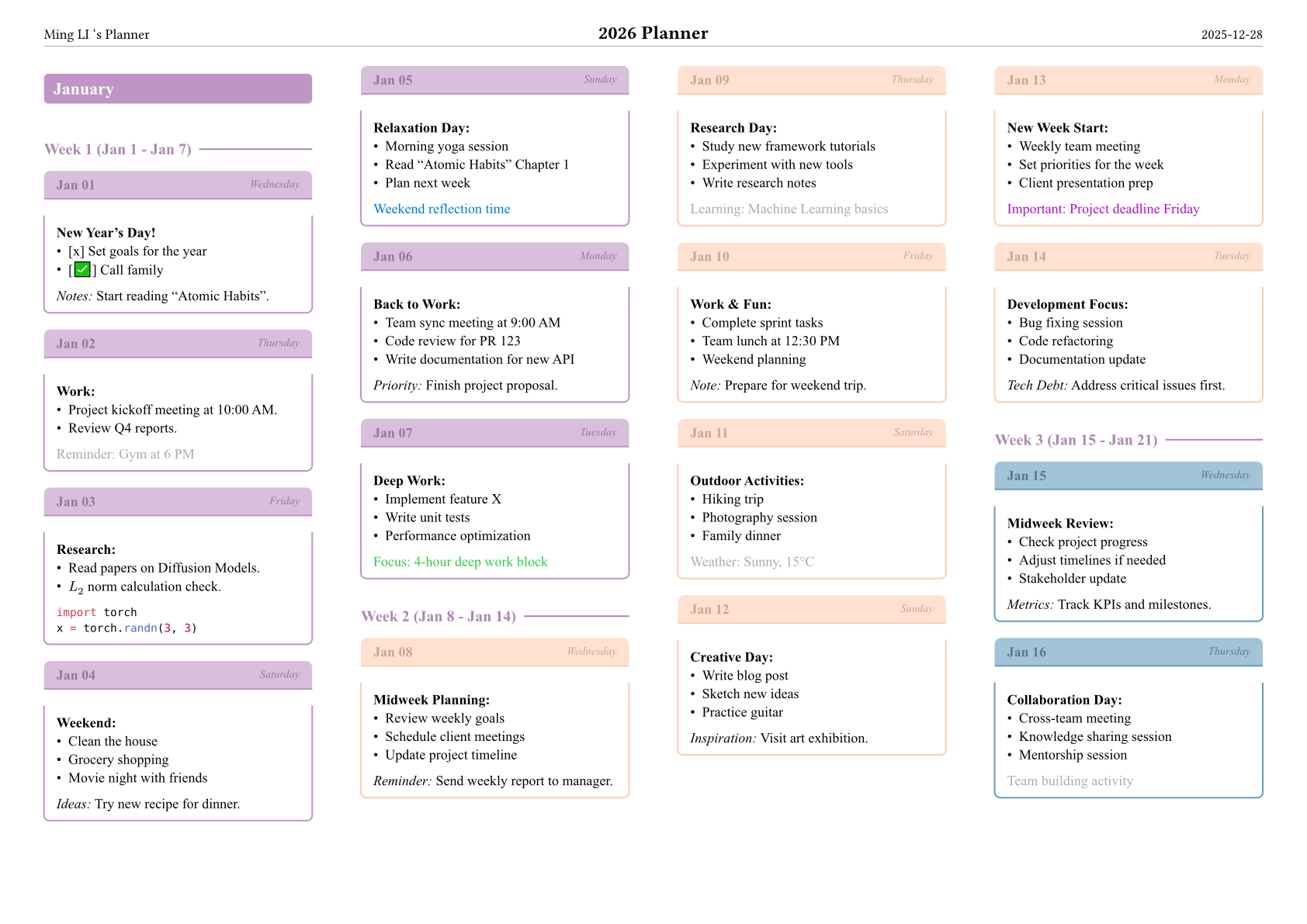
On daily work and academic research, a well-organized and aesthetically pleasing schedule planner is the key to efficient time management. Traditional planning tools, however, are often limited by rigid formatting, poor customizability and monotonous visual presentation. To address these pain points, this project presents a personal schedule planner template built with Typst — a lightweight yet highly customizable planning solution that combines delicate modular design with a rich color system, perfectly suited for academic research, work task management and daily life planning.

Typst 个人日程规划模板开发(Personal Planner Template)

项目介绍

基于 Typst 的个人日程规划模板,适用于生成年度/月度计划文档。它通过灵活的配色系统、美观的每日记录框与紧凑的多栏布局,让日程内容清晰易读,同时兼顾视觉美感与实用性。

主要功能

  1. 配色方案
    • 内置8种柔和配色(紫色、杏色、蓝色、粉红、深紫、金黄、浆果色、深红);
    • 颜色随月份/周次自动循环,实现不同时间块的视觉区分。
  2. 每日记录框 (Day Box)
    • 自动根据星期几匹配配色;
    • 包含「日期+星期」标题栏与内容区域,带轻微阴影提升层次感;
    • 支持任意 Typst/Markdown 内容(列表、代码块、数学公式等)。
  3. 模板主函数 (Planner Template)
    • 页面配置:A4横向、4栏紧凑布局,适配打印/数字阅读;
    • 页眉模块:显示作者、年份、当前日期;
    • 标题样式
      • 一级标题(月份):彩色块背景+白色文字;
      • 二级标题(周次):彩色文字+下划线装饰;
    • 多语言字体支持:默认适配「Times New Roman + 思源宋体」。

设计特点

  • 灵感源自 Typst 社区优秀示例(dvdtyp、boxedsheet);
  • 配色柔和不刺眼,适合长时间阅读;
  • 布局紧凑但不拥挤,最大化页面利用率;
  • 样式与内容分离,便于后续维护和扩展。

使用方法

1. 导入模板

代码段

1
#import "planner.typ": planner, day-block

2. 启用模板

代码段

1
2
3
4
#show: planner.with(
year: "2025",
author: "你的名字"
)

3. 添加日程内容

代码段

1
2
3
4
5
6
7
8
9
10
11
12
// 定义月份(一级标题)
= January

// 定义周次(二级标题)
== Week 1 (Jan 1 - Jan 7)

// 添加每日记录
#day-block("Jan 01", "Wednesday")[
*New Year's Day!*
- [x] 制定年度目标
- [ ] 给家人打电话
]

使用案例:2026年1月日程规划

以下代码展示了如何自定义组件并生成一个完整的月度规划页面:

代码段

1
2
3
4
5
6
7
8
9
10
11
12
13
14
15
16
17
18
19
20
21
22
23
24
25
26
27
28
29
30
31
32
33
34
35
36
37
38
39
40
41
42
43
44
45
46
47
48
49
50
51
52
53
54
55
56
57
58
59
60
61
62
63
64
65
66
67
68
69
70
71
72
73
74
75
76
77
78
79
#import "planner.typ": *

// 自定义彩色每日块(支持手动指定颜色索引)
#let day-block-colored(date, weekday, color-index, content) = context {
let current-color = color-box.at(calc.rem(color-index, color-box.len()))

// 外层盒子(带阴影)
block(
width: 100%,
breakable: false,
inset: 0pt,
radius: 4pt,
stroke: none,
fill: white,
outset: (bottom: 2pt, right: 2pt),
{
// 标题栏:日期+星期
box(
width: 100%,
fill: current-color.lighten(40%),
inset: (x: 8pt, y: 6pt),
radius: (top: 4pt),
stroke: (bottom: 1pt + current-color),
grid(
columns: (1fr, auto),
align: (left, right),
text(weight: "bold", fill: current-color.darken(20%), date),
text(size: 0.8em, fill: current-color.darken(20%), style: "italic", weekday)
)
)
// 内容区域
block(
width: 100%,
inset: 8pt,
stroke: (left: 1pt + current-color, right: 1pt + current-color, bottom: 1pt + current-color),
radius: (bottom: 4pt),
content
)
}
)
}

// 启用模板
#show: planner.with(
year: "2026 Planner",
author: "Ming LI"
)

// ================= 一月 =================
= January

// ------ 第一周 (1月1日-1月7日) ------
== Week 1 (Jan 1 - Jan 7)

#day-block-colored("Jan 01", "Wednesday", 0)[
*New Year's Day!*
- [x] Set goals for the year
- [✅] Call family

_Notes:_
Start reading "Atomic Habits".
]

#day-block-colored("Jan 02", "Thursday", 0)[
*Work:*
- Project kickoff meeting at 10:00 AM.
- Review Q4 reports.

#text(fill: gray)[Reminder: Gym at 6 PM]
]

#day-block-colored("Jan 03", "Friday", 0)[
*Research:*
- Read papers on Diffusion Models.
- $L_2$ norm calculation check.

```python
import torch
x = torch.randn(3, 3)

]

// —— 第二周 (1月8日-1月14日) ——

== Week 2 (Jan 8 - Jan 14)

#day-block-colored(“Jan 08”, “Wednesday”, 1)[

Midweek Planning:

  • Review weekly goals
  • Schedule client meetings
  • Update project timeline

Reminder:

Send weekly report to manager.

]

Comments

Comments are enabled. Feel free to join the discussion.

Comments will be recorded via GitHub Issues